Secure SQL AI Analyst: Enabled by Pomerium & ChatGPT Developer Mode
See how to connect a custom SQL data to ChatGPT Dev Mode via Pomerium's agentic access management to create an AI business analyst.
See how to connect a custom SQL data to ChatGPT Dev Mode via Pomerium's agentic access management to create an AI business analyst.
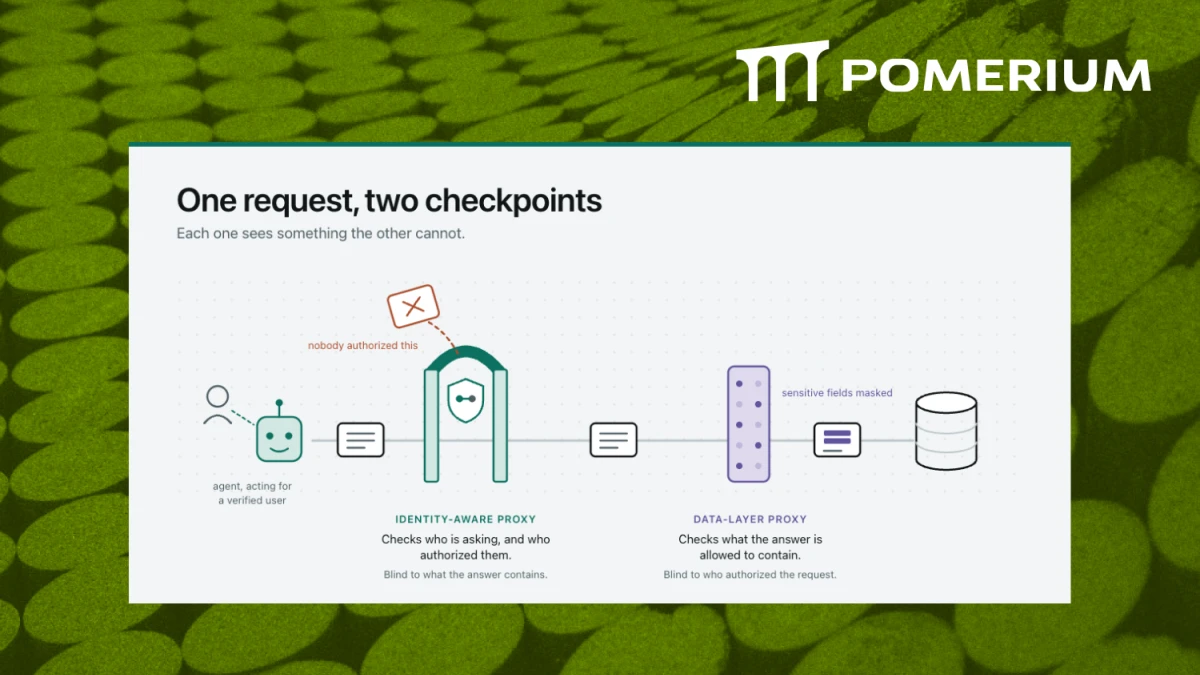
OpenAI’s new ChatGPT Developer Mode adds native support for Model Context Protocol (MCP) servers. For developers building agent tools, this is a big step: you can now plug in custom MCP servers, like a SQLite database, directly into ChatGPT. However, bridging local development environments with cloud-hosted LLMs isn’t simple, and VPNs don’t work in this model. That’s where Pomerium comes in.
The demo below shows how to make bridging local MCP servers with a cloud hosted LLM like ChatGPT Developer Mode secure, simple, and scalable. And it all starts with choosing the right MCP gateway.
Got Ideas?
Ideas for how to make this better? We'd love to hear them. Some things we're thinking about is how to connect multiple clients and make it easier to jump between them all within the same UX. Connect with us on social or mcp@pomerium.com.
How it works
Video Recap
Connecting MCP Server to ChatGPT Dev Mode:
Once the tunnel was set up:
Why It Matters:
Broader Implications: